

I still remember the week I “fixed” our HR stack and accidentally created three new inboxes nobody owned. The tool demo was gorgeous; the handoff reality was… not. That experience changed how I evaluate AI Tools for HR: I now obsess less over shiny AI-Powered Features and more over what happens on a random Tuesday when someone needs Leave Management, Employee Relations help, and a clean Performance Review—fast. In this post, I’m doing a practical, slightly opinionated HR software comparison of AI HR solutions I keep seeing in 2026 conversations, plus what I wish someone had told me before I clicked “Start trial.”
1) My “Tuesday Test” for Best AI Tools (HR in 2026)
I judge AI Tools for HR on a boring Tuesday, not a demo day. If it can’t help when my calendar is packed and a manager is pinging me twice, it’s not one of the Best AI Tools for HR in 2026. I learned this the hard way after I created “just one more” shared inbox for onboarding questions. It worked for a week, then turned into a messy handoff trail.
Patty McCord: “The real test of any people system is whether it helps a manager do the right thing on a busy day.”
My scoring rubric (what I actually track)
Think of the HR stack like a kitchen: AI is a sous-chef, not the head chef—unless you give it recipes (workflows). My rubric:
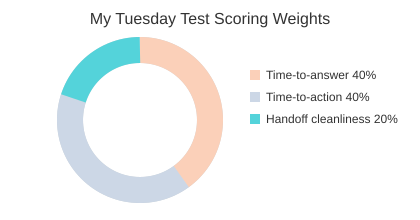
- Time-to-answer (40%): how fast a confused employee gets a correct answer in the Self-Service Portal.
- Time-to-action (40%): how fast the tool triggers the next step (ticket, doc, approval).
- Handoff cleanliness (20%): does it land with the right owner, with context?
Where AI-Powered Features win (or fail)
Edges matter: managers, new hires, and confused employees. AI-Powered Features look great until a policy answer needs a real exception, or onboarding spans Onboarding Tools, Performance Management, and Employee Relations. This is where Integration Capabilities decide everything. Zapier can orchestrate workflows across 8,000+ apps without replacing your HRIS, while Workday HCM is strong when you need an all-in-one platform with real-time analytics and AI insights.
Tiny tangent: the quiet cost of “one more tool”
HR automation tools can backfire when they add logins, duplicate data, and unclear owners. Automation is only “fast” if the handoff is clean.
Mini checklist before any pilot
- Document owners for each workflow step.
- Set SLAs (response + resolution).
- Define data boundaries (what the AI can read/write).
| Item | Target |
|---|---|
| Time-to-answer weight | 40% |
| Time-to-action weight | 40% |
| Handoff cleanliness weight | 20% |
| Pilot timeline | 2 weeks baseline + 4 weeks pilot + 2 weeks review |
| Adoption target | 70% of employees use Self-Service Portal within 60 days |
2) Employee Relations: Instant ER Expertise vs. “Good Luck”
Employee Relations is where AI-Powered HR can help the most—and also where it can scare people. ER is full of context: tone, history, and risk. I once wrote an ER memo at midnight, and the hardest part wasn’t the policy—it was choosing the next step that was fair and consistent.
Laszlo Bock: “Good HR is mostly good judgment—and good judgment needs good information delivered at the right moment.”
Why HR Acuity leads for Instant ER Expertise
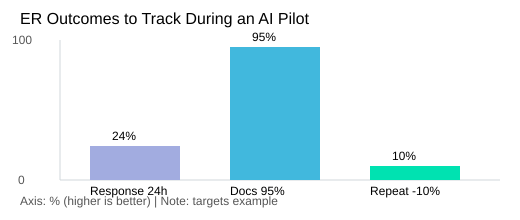
In my bake-off, HR Acuity stands out as the leading AI tool for HR and employee relations in 2026, trained on 20 years of best practices. To me, that means fewer “it depends” answers and more consistent guidance: the same fact pattern should lead to the same recommended workflow, documentation prompts, and escalation options.
| Item | Data |
|---|---|
| HR Acuity training base | 20 years of best practices |
| Initial response target | <24 hours |
| Documented next-step rate | 95% |
| Repeat-case reduction | 10% over 6 months |
Using AI Insights without a surveillance vibe
I use AI Insights to spot process gaps (missing notes, overdue follow-ups), not to “score” employees. The goal is better case handling, not monitoring behavior.
4:55pm scenario: the Conversational Interface
If a manager pings at 4:55pm, the Conversational Interface should: ask key questions, draft a compliant next-step plan, generate a neutral summary for the case file, and flag urgency (e.g., safety, harassment) for immediate escalation.
- Guardrails: audit trails, role-based access, clear escalation paths.
- ER outcomes to track: case resolution time, repeat incidents, manager satisfaction.
3) Performance Management That Doesn’t Feel Like Homework
In real-life Performance Management, I want fewer forms and better conversations. I still remember one Performance Reviews cycle that derailed because half the feedback lived in Slack threads, a few notes were in calendars, and the “final” doc missed key context. The result: more debate about Performance Data than coaching.
Lattice Best Features (as I see them): AI Agents that nudge, not nag
From the comparisons I reviewed, Lattice Best Features center on AI Agents that support employee engagement, flag possible disengagement, and help with performance support. I like this when it turns “I think they’re struggling” into “here are signals and prompts for a better 1:1.” Use cases I’d actually use:
- Manager coaching prompts that turn notes into clear talking points
- Calibration support that highlights gaps and inconsistencies
- Lightweight reminders so Goal Tracking stays visible weekly
Peoplebox.ai: OKRs + Performance Reviews + AI-assisted workflows
Peoplebox.ai’s angle is simple: unify OKRs, Performance Reviews, and AI-assisted workflows with deep integrations. Conceptually, that matters because custom workflows and integration capabilities (Slack/Teams, HRIS, calendar) reduce copy-paste admin. My admin target is <30 minutes per direct report per month.
AI-Powered Benchmarking: helpful vs. trust-breaking
AI-Powered Benchmarking helps when it’s transparent (what’s compared, why, and how to challenge it). It breaks trust when it feels like a hidden score. As Kim Scott said:
“Radical Candor is guidance that’s both kind and clear—and tools should make that easier, not harder.”
My rule: if Goal Tracking isn’t visible weekly, it won’t matter quarterly.
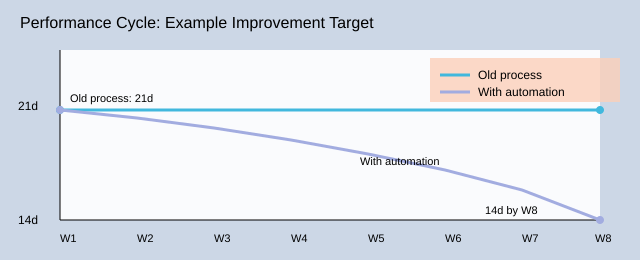
| Metric | Example Target |
|---|---|
| Review cycle time | 21 days → 14 days |
| OKR adoption | 80% teams updating weekly by week 6 |
| Manager admin load | <30 min/direct report/month |

4) Onboarding Tools + Conversational Assistant: The First 30 Days
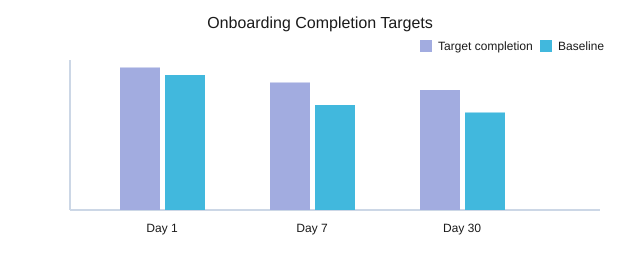
Employee Onboarding is my highest-leverage place for HR automation because it’s easy to measure: completion rates, ticket volume, and time-to-productivity. I’ve also lived the “small moments” problem—like forgetting where the handbook lived—so I optimize for fast answers, not more PDFs.
Josh Bersin: “The employee experience is built in the small moments—answers, nudges, and clarity—more than in big programs.”
Leena AI Features: a Conversational Assistant that actually deflects tickets
From the source material, Leena AI provides a Conversational Assistant for task automation, query resolution, and onboarding. In practice, I use it to: trigger Day 1 checklists, answer “how do I…” questions, and route edge cases to a human. I keep integration boundaries clear: the bot can read policy and status, but sensitive actions require role checks and audit logs.
Custom HR Portals with Softr (no-code) + Self-Service Portal wins
Softr lets me build Custom HR Portals (no-code) that integrate with existing HR systems. My favorite trick is making HR feel local: one page per team with the right links, forms, and FAQs. A solid Self-Service Portal reduces repeat questions—my target is a 25% drop in “how do I” tickets in 60 days.
12 new-hire questions: what to automate vs. human?
- Automate: Wi-Fi/VPN, payroll dates, benefits links, org chart, “where’s the handbook,” basic Leave Management (preview).
- Human: role clarity, manager expectations, accommodations, conflict, career goals.
| Metric | Example |
|---|---|
| Day 1 completion target | 95% |
| Day 7 completion target | 85% |
| Day 30 completion target | 80% |
| Ticket deflection goal | 25% fewer “how do I” in 60 days |
| Time-to-productivity survey | 3.8/5 → 4.2/5 |
5) Real-Time Analytics: When Workday HCM (or Similar) Makes Sense
Real-Time Analytics is the part leaders think they want—until they see how messy HR data is. In the source comparison, Workday HCM is positioned as an all-in-one HR platform with real-time analytics and AI-powered insights. That “all-in-one” matters because it reduces the spreadsheet glue that breaks trust.
Arianna Huffington: “What gets measured gets managed—but only if people trust the measurement.”
Workday HCM Features I’d actually care about
- All-in-one workflows so hiring, job changes, and comp updates don’t live in five systems.
- AI Insights that explain drivers (not just flags) and let me audit inputs.
- Reporting that isn’t a part-time job—clean filters, consistent definitions, and repeatable dashboards.
Workforce Planning without pretending the future is fixed
For Workforce Planning, I use trends as signals, not destiny. My cadence: weekly ops dashboard + monthly planning review. I also track a simple metric: reduce time to answer a headcount question from 3 days to 1 day.
Compensation Management: where I slow down
Compensation Management is where access controls and explanations matter most. If a model suggests changes, I want the “why,” the data used, and who can see what—before anyone touches pay.
The uncomfortable truth: Integration Capabilities decide if analytics lie
If your Integration Capabilities are weak, your analytics will lie politely. Also watch for dashboard theater: pretty charts, no decisions.
| Checkpoint | Target |
|---|---|
| % employees with complete job profiles | 98% |
| Manager hierarchy accuracy | 99% |
| Comp bands coverage | 95% |


6) Recruiting: AI Recruiting Tools That Save Time (Not Just Add Opinions)
In this bake-off, I judge AI Recruiting Tools by one thing: do they remove work, or just add “insights” I still have to verify?
Candidate Sourcing: automation helps—if the signal is clean
Candidate Sourcing is where Recruitment Automation can win fast. But only if your inputs are tight: clear role scorecards, consistent titles, and a shared definition of “must-have.” If the signal is messy, automation scales the mess.
Metaview: Interview Summaries that end note chaos
Metaview stands out because it focuses on execution: Interview Summaries that are AI-generated, plus sourcing agents and ATS integrations for recruiting. With ATS integrations, summaries land where the team already works, instead of living in random docs.
Practically, this changes my debrief cadence: I push for same-day written feedback, then a 30-minute debrief. When summaries are consistent, time-to-feedback drops because nobody is decoding five different note styles.
Greenhouse Analytics: what I measure to spot drop-offs and bias risks
I use Greenhouse Analytics as a lens: stage conversion rates, time-in-stage, and interviewer “no decision” patterns. If one panel or stage creates delays or uneven pass-through, I treat it as a process bug, not a people problem.
Hypothetical: 30 roles open—what breaks first?
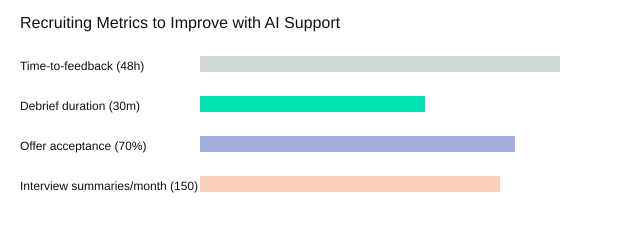
At 30 open roles × 5 interviews each, that’s 150 interviews/month—so 150 interview summaries generated/month. Without automation, what breaks first is time-to-feedback (and candidates feel it).
Reid Hoffman: “AI won’t replace recruiters—but recruiters who use AI will replace those who don’t.”
My two-person rule
- AI can summarize and route work.
- Final decisions require two humans reviewing evidence, not vibes.
Tiny warning: don’t let AI write your employer brand in a voice nobody uses.
| Metric | Target |
|---|---|
| Time-to-feedback | <48 hours |
| Debrief duration | 30 minutes |
| Offer acceptance rate | 70% |
| Volume scenario | 30 roles; 5 interviews/role; 150 summaries/month |
7) Leave Management & The Budget Reality Check (Zoho People + Friends)
Leave Management: the unglamorous win
Leave Management is boring—and that’s why I start here. If leave requests are messy, everything else feels “AI-powered” but still slow. Zoho People consistently shows up as a practical choice because it excels in affordable attendance, leave management, and employee self-service.
Zoho People Pricing vs HR Technology Pricing: how I compare
I don’t chase the lowest sticker price. I compare Zoho People Pricing the same way I compare any HR Technology Pricing: by mapping tiers to real workflows and hidden work.
| Base subscription | Add-ons | Implementation | Admin hours/month |
|---|---|---|---|
| Core HR + leave | Attendance, approvals, integrations | Data import, policy setup | Reporting, exceptions, audits |
Attendance + Self-Service Portal: the features people thank you for
When the Self-Service Portal is simple, employees stop emailing HR for every half-day. (Also: holiday calendars are chaos—one wrong regional holiday and your “accurate” balances explode.)
Daniel Pink: “Autonomy is a powerful motivator—self-service systems can increase it when they’re genuinely easy to use.”
- Leave requests processing goal: cut average handling from 2 days to 0.5 days
- Self-service adoption goal: 75% of leave requests submitted without HR intervention

Global Compliance: where I stop improvising
For Global Compliance, I ask vendors for proof: country rules supported, audit logs, policy versioning, and how accruals handle local law changes.
My tip
Pick one “boring win” (leave + attendance + self-service) before you chase AI agents everywhere.
8) The Glue Layer: Zapier, Custom Workflows, and My “No More Tabs” Pact
I used to budget money for licenses first. Now I budget time for Integration Capabilities first, because disconnected tools create hidden work. My worst day hit 18 tabs open. I made a pact: get it down to 8 tabs during an HR ops day by leaning on HR Automation instead of memory.
Zapier as the orchestration layer for HR automation tools
From the “Essential HR Tools Compared” lens, Zapier is practical middleware: it orchestrates AI across your HR stack and connects 8,000+ apps for automation without replacing your HRIS. That matters when you already run onboarding, recruiting, performance, and leave in different systems but want them to feel like one product—with a simple Conversational Interface.
Custom Workflows: the first five I’d build
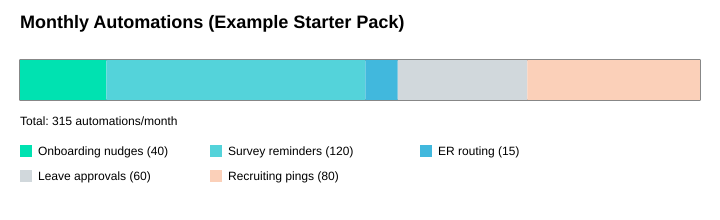
- Onboarding nudges (40/month): auto-remind managers for day-1, week-1, and 30-day tasks.
- Survey reminders (120/month): pulse follow-ups until completion.
- ER intake routing (15/month): send cases to the right HRBP with the right privacy.
- Leave approvals (60/month): route requests, log decisions, notify payroll.
- Recruiting debrief pings (80/month): prompt scorecards and schedule debriefs.
AI Agents: helpful vs. mascot
AI Agents are legit when they draft summaries, pull status, and trigger workflows. They’re a mascot when they only chat but can’t write back to your systems.
Satya Nadella: “The real promise of AI is amplifying human capability—especially in the everyday workflows that define productivity.”
| Item | Data |
|---|---|
| Zapier integrations | 8,000+ apps |
| Onboarding nudges | 40/month |
| Survey reminders | 120/month |
| ER intake routing | 15/month |
| Leave approvals | 60/month |
| Recruiting debrief pings | 80/month |
| Tab reduction goal | 18 → 8 tabs |
My pick list is simple: I run a Tuesday Test on one real process (ER, onboarding, recruiting, performance, leave, or analytics), I choose tools that can both read and write data through integrations, and I only add AI when it reduces handoffs. Do that, and your stack stops feeling like six products and starts feeling like one.
TL;DR: If you’re choosing AI Tools for HR in 2026, start with the workflow you can’t afford to break (ER, onboarding, performance, recruiting). Then match tools by strength: HR Acuity for Employee Relations depth, Workday HCM for all-in-one with Real-Time Analytics, Leena AI for a Conversational Assistant, Lattice/Peoplebox.ai for performance + goals, Workleap for Engagement Surveys, Metaview for interview summaries, Zoho People for budget-friendly leave/attendance, Softr for Custom HR Portals, and Zapier to stitch it all together (8,000+ apps).


