
The first time I tried to “improve operations,” I did what many of us do: I made a giant list. It was 50-something bullets long, color-coded, and—if I’m honest—mostly a form of procrastination. A week later, nothing had changed except my calendar was now a crime scene. That’s when I realized tips aren’t the problem; *tip retrieval* is. In this post, I’m treating “63 operations tips” like raw material: I’ll sort them into a few sticky mental buckets, add the tech layer (Enterprise Information Systems, ERP, SCM), and then use Keywords Frequency Analysis and Term Frequency Analysis as a reality check so I don’t keep optimizing yesterday’s work.
1) My “63 Tips” Sorting Trick (So I’ll Actually Use Them)
I used to treat “63 operations tips” like a checklist: print it, highlight it, feel productive, then never touch it again. Now I treat tips like a deck of cards. I don’t try to “do them all.” I deal five tips into my week, test them in real work, and then reshuffle every Friday. That rhythm keeps the list useful instead of overwhelming, and it turns operations tips into weekly experiments instead of homework.
My 3 buckets (and the rule that hurts)
To make keyword analytics and ops advice actually stick, I sort every tip into one of three buckets:
- Make decisions faster (less waiting, fewer meetings, clearer owners)
- Make work visible (simple dashboards, clear status, fewer surprises)
- Make systems boring (repeatable steps, fewer special cases, less drama)
Here’s the painful rule: anything that doesn’t fit gets cut. Not “saved for later.” Cut. If a tip can’t speed decisions, show work, or make the system calmer, it’s probably a distraction dressed up as improvement.
The day I deleted 14 SOPs (and nothing exploded)
My favorite learning moment came from a cleanup day. I had a folder full of “nice-to-have” SOPs—extra steps, edge cases, and documents no one opened unless they were already stressed. I deleted 14 of them. I expected chaos. Instead, nothing happened. No fires. No angry messages. Just… silence. That taught me a core operations lesson: complexity feels safe, but it often creates more risk than it removes.
A tiny ritual before any process change
Before I change a workflow, I write one sticky note and place it on my screen:
What would break if I’m wrong?
That question forces me to think about failure modes, not just best-case outcomes. If the answer is “a client deliverable slips” or “billing gets delayed,” I add a small safeguard first (like a rollback plan or a quick checkpoint).
My wild-card analogy: dishwashing
Operations is like dishwashing. If you don’t keep the sink clear, every meal tastes like chaos. The goal isn’t fancy tools—it’s a clean, repeatable flow. That’s why I deal five tips, sort them into the three buckets, and keep the system boring enough to run on busy weeks.

2) Decision Hygiene: The Unsexy Skill That Saves My Week
Most “busy pro” problems I see (and create) are not time problems. They’re decision problems. We re-litigate the same call, we wait for perfect data, and we reopen choices in the middle of stress. From my ops notes, the fix is simple but not glamorous: decision hygiene. It’s the small system that keeps decisions clean, searchable, and stable.
My rule: if we’ll debate it again in 30 days, it gets a decision log
I keep a lightweight decision log for anything that might come back: tool choices, process changes, keyword tracking rules, reporting cadence, even “who owns what.” The goal is not paperwork. The goal is to stop memory-based arguments.
- Owner (who made the call or is accountable)
- Date (so we know what we knew then)
- Context (the problem, constraints, and options)
- What we chose (the actual decision, in plain language)
- What would change my mind (the trigger for revisiting)
For keyword analytics, this is huge. If we decide “we track top 20 keywords weekly, not daily,” I log it. When someone asks for daily updates later, I can point to the decision and the reason.
I set “good-enough thresholds” so I stop waiting for perfect info
I use a simple confidence rule: if I’m at 70% confidence, I decide. If I’m below that, I ask, “What’s the cheapest info that gets me to 70%?” This keeps ops work moving without pretending we can predict everything.
“Perfect information is expensive. Good-enough decisions are usually cheaper—and faster to correct.”
I pre-commit to review windows (no panic revisits)
Instead of reopening decisions in the middle of a fire drill, I schedule review windows. Example: “We’ll revisit this in 2 weeks” or “first Monday of next month.” That way, changes happen on purpose, not because someone is anxious in a meeting.
Tiny example: the one-paragraph decision memo (I hated it at first)
I cut meeting time by requiring a one-paragraph decision memo before we discuss anything that affects workflow or reporting. It felt annoying. Then it worked. People came in aligned on the question, the options, and the tradeoffs—so we spent less time circling and more time choosing.
Decision: ______. Because: ______. Risks: ______. Revisit if: ______.
3) Flow > Frenzy: Bottlenecks, WIP Limits, and the SCM Reality Check
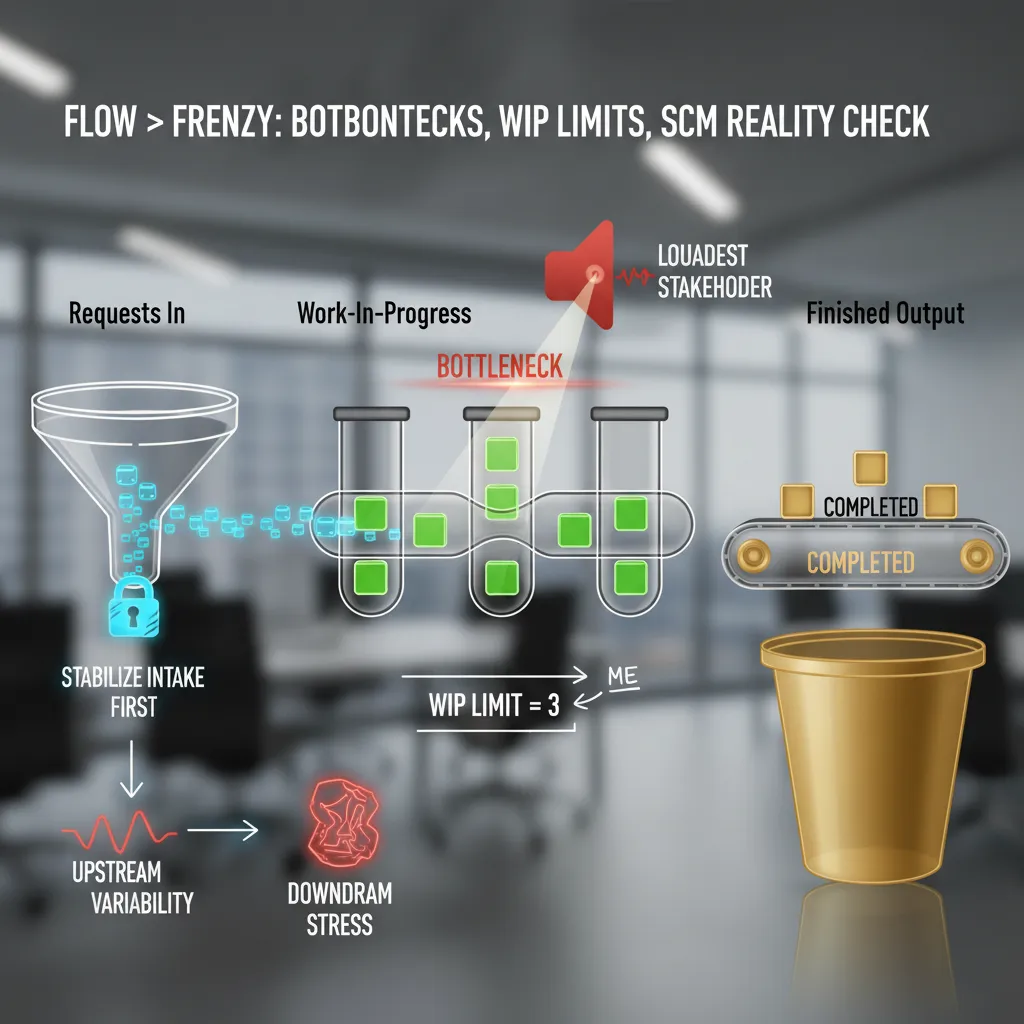
When my workload feels chaotic, I stop treating it like a pile of random tasks and start mapping it like a supply chain: requests in, work-in-progress, and finished output. This simple view helps me see what’s actually happening, not what’s being shouted about. In real operations, the bottleneck sets the pace. Same here. The bottleneck gets my attention, not the loudest stakeholder.
Map the flow (like a mini supply chain)
I do a quick scan and label work into three buckets. If I can’t place a task, it’s usually not ready or not real.
- Intake: new requests, emails, “quick questions,” meeting follow-ups
- WIP: tasks I’ve started and will finish soon
- Output: shipped work (sent, published, closed, delivered)
My personal WIP limit: 3 “real” tasks
I use a WIP limit for myself (yes, individuals need them too). If I’m juggling more than three real tasks, quality drops and cycle time stretches. “Real” means it takes focus and has a clear deliverable. Everything else is either admin or noise.
When I hit my limit, I don’t “work harder.” I stop starting. I either finish something, park something, or renegotiate scope. If I need a quick reminder, I write it like a rule:
if WIP > 3: stop intake, finish 1, then pull next
The SCM reality check: stabilize intake first
Here’s the Supply Chain Management lens that keeps me honest: upstream variability creates downstream stress. If intake is messy—random priorities, unclear requests, surprise deadlines—then WIP explodes and output becomes late and sloppy.
So I stabilize intake before I optimize anything else:
- Batch requests: check email/Slack at set times, not constantly
- Standardize the ask: “What’s the deadline, definition of done, and owner?”
- Protect the bottleneck: give focus time to the step that’s slowing everything
Informal aside: my inbox is basically a port strike that I caused.

4) Systems That Don’t Wake Me Up at 2 A.M.: ERP, SOA, Cloud
I treat Enterprise Resource Planning (ERP) like plumbing: invisible is the goal. If it’s exciting, something’s leaking. In ops, “exciting” usually means duplicate records, broken approvals, or a month-end close that turns into a fire drill. My rule is simple: the best ERP system is the one people don’t talk about because it quietly keeps finance, inventory, purchasing, and reporting in sync.
ERP: Make it boring on purpose
When I review an ERP setup, I look for boring signals: one source of truth, clean master data, and clear ownership. If teams keep exporting spreadsheets “just to be safe,” the ERP isn’t trusted—and that’s where errors breed.
- Define owners for customers, items, vendors, and chart of accounts.
- Standardize workflows (purchase orders, approvals, receiving) before adding new modules.
- Measure stability: fewer manual fixes, fewer “urgent” tickets, fewer surprise variances.
SOA: It’s not about cool microservices
I learned (the hard way) that Service Oriented Architecture (SOA) is less about “microservices coolness” and more about clear contracts between teams. If one system depends on another, the handoff must be written down and tested. Otherwise, every change becomes a guessing game, and ops pays the price in delays and rework.
When the contract is unclear, the integration becomes a rumor.
- Document inputs/outputs: fields, formats, timing, and error handling.
- Agree on ownership: who fixes what when data fails.
- Version your interfaces so updates don’t break downstream teams.
Cloud: Reduce friction, not add dashboards
Cloud computing services help when they reduce friction—not when they multiply dashboards. I’m fine with SaaS, PaaS, and managed tools, but I watch for “tool sprawl”: five logins, three alerting systems, and no shared view of what’s actually happening.
Quick tech-to-ops bridge: data flow or process lies
Here’s my bridge between tech and operations: if data can’t move between tools, your process will start lying to you. Lead times look fine until you realize orders are stuck in a queue. Inventory looks accurate until returns live in a separate app.
I keep a short checklist:
- Can data move automatically (API, webhook, ETL), not by copy/paste?
- Is there one reporting layer, or competing “truths”?
- Do alerts point to action, or just noise?
5) The Keyword Nerd Interlude: TF‑IDF, Search Frequency Rank, and Why Ops People Should Care
I know, “keyword analytics” sounds like a marketing side quest. But in ops, words are part of the system. If our SOPs and playbooks use fuzzy language, people execute fuzzy work. So I borrow a few simple keyword tools as a fast reality check—especially when I’m updating documentation from my “63 operations tips” style notes into something teams can actually run.
Term Frequency: what I overuse (and what I forget)
Every few months I run a quick Term Frequency scan on my SOPs. I’m not trying to be fancy—I just want to see what I’m over-emphasizing. My usual top word? “urgent.” That’s a smell. If everything is urgent, nothing is prioritized.
Then I look for what barely shows up. It’s often “handoff,” “owner,” or “definition of done.” That’s also a smell. Ops breaks at the seams, not in the middle of a task.
- Overused terms can signal chaos (“urgent,” “ASAP,” “quick”).
- Missing terms can signal gaps (“handoff,” “SLA,” “rollback”).
TF‑IDF: are my docs actually distinct?
I use TF‑IDF as a sanity check: are my docs distinct, or are they the same memo wearing different hats? If two playbooks have nearly identical “important” terms, I probably copied a template and forgot to make real decisions.
Here’s the simple idea:
TF = how often a term shows up in one doc.
IDF = how rare that term is across all docs.
If “escalation,” “triage,” and “on-call” score high in an incident SOP, great. If “meeting,” “update,” and “alignment” score high everywhere, I’m writing vibes—not instructions.
Search Frequency Rank: demand shifts, so language should too
I also peek at Brand Analytics style data—think Search Frequency Rank like Amazon uses. Not because I’m selling products, but because it reminds me that demand shifts. If customers start searching “self-serve,” “real-time,” or “refund,” our internal language should evolve too. Otherwise, our docs lag behind reality.
Confession: words aren’t adoption
Slight confession: I once optimized a doc for a “hot” internal keyword…and nobody used the process. The title was perfect. The workflow was not. That’s the ops lesson: keywords can improve clarity, but they can’t force behavior. Adoption still needs training, ownership, and feedback loops.
6) Closing the Loop: RFID, Quality of Service, and My Favorite Ops “Magic Trick”
If there’s one theme I keep coming back to in ops, it’s this: close the loop. I love tiny sensors and timestamps because they turn arguments into observable reality. When two teams disagree about where delays happen, I don’t want louder opinions—I want a trail. A simple scan at intake, a timestamp at handoff, and a final “done” signal can show the real story. Radio Frequency Identification (RFID) is the extreme version of this idea: items tell you where they are, when they moved, and how long they sat. That’s not “more data for the sake of data.” That’s clarity.
Quality of Service Is a Trust Metric
Quality of Service (QoS) isn’t just an IT metric. Customers feel it as “I trust you” or “I don’t.” They don’t care if your internal dashboard says 99.9% uptime if their order confirmation arrives late, their package tracking is wrong, or support takes three days to respond. In my experience, QoS is the sum of small promises kept: accurate status, predictable lead times, and fast recovery when something breaks. When you track timestamps across the journey, you can connect QoS to real moments—like “time from order to pick,” “time in WIP,” and “time from ship to delivered.” That’s how you stop guessing and start improving.
My Favorite Ops “Magic Trick”
My favorite “magic trick” is simple: I run one two-week experiment, publish results in plain language, and retire one sacred-cow habit. The trick isn’t the experiment—it’s the public scoreboard. I’ll pick one bottleneck, define one metric, and change one behavior. Then I share what happened without drama: what we tried, what improved, what got worse, and what we’re keeping. People relax when the truth is visible. And once a sacred habit is replaced by a measured result, it rarely comes back.
Wild-Card Scenario: Pop-Up Bakery Ops
If I had to run ops for a pop-up bakery tomorrow, I’d still use the same playbook: intake, WIP, handoffs, and a brutally simple ERP spreadsheet. Orders come in (intake), dough and prep move through stations (WIP), finished goods transfer to the counter or delivery (handoffs). I’d track timestamps with a phone, a clipboard, or QR codes—whatever works. The point is not fancy tools. The point is closing the loop so every improvement is based on what actually happened, not what we assume happened.
TL;DR: I grouped 63 operations tips into a few high-impact themes: decision hygiene, flow + bottlenecks, systems thinking (ERP/SCM/SOA), and measurement. Then I added a keyword-analytics layer—TF-IDF, Search Frequency Rank, and Research Topic Trends—so the practices stay relevant and measurable.


