

The first time I watched a month-end close drag into day three, I remember thinking, “This can’t be what modern work is supposed to feel like.” We had spreadsheets taped together with hope, a Slack channel full of ‘urgent’ pings, and a reconciliation file that seemed to grow teeth at night. Fast-forward: the teams I’ve interviewed (and the workflows I’ve personally wrangled) are getting something close to “boring finance”—the good kind—because AI is taking over the repeatable parts. Not magically. Not perfectly. But measurably. This post is my field guide to finance operations transformed by AI: real results, real tradeoffs, and a couple of unexpected lessons I didn’t see coming.
1) The “busywork bonfire”: workflow automation that sticks
Before I got serious about workflow automation, my days in finance operations were a loop of copy/paste, renaming files, and chasing approvals in email threads. I’d pull invoice data into spreadsheets, ping managers for sign-off, then re-key the same fields into the ERP. It wasn’t “hard”—it was endless.
Now the automation handles the boring parts: capture, validation, routing, reminders, and clean handoffs. In one illustrative baseline I tracked, we went from 120 hours/week of manual processing to 30 hours/week after automation. That’s the kind of shift that matches what research shows in banking operations: 75% less manual effort, and even loan approvals moving 5× faster when workflows stop stalling at handoffs.[1]
Where the 75% manual-effort drop actually shows up
- AP + invoice processing: auto-extract fields, match to PO/receipts, and route exceptions.
- Reconciliations: auto-pull bank files, flag breaks, and open tickets with context.
- Ticket triage: classify requests (vendor setup, payment status) and assign to the right queue.
Small AI use cases that add up (and avoid the “pilot trap”)
I’ve seen teams run too many demos and not enough production fixes—the classic use case trap (the banking.vision white paper is useful contextual reading).[1] The wins that stick are often “unsexy”:
- Exception routing with clear rules + AI suggestions
- Auto-coded journal entries for repeat patterns (with human review)
- Invoice processing that escalates only what’s truly unclear
A quick tangent: automate the “last mile,” not just dashboards
Dashboards don’t move work forward. Approvals and handoffs do. I learned this the hard way when a bot broke because a vendor changed their invoice formatting—suddenly the “smart” part failed, but the approval workflow still saved us because it routed the exception to a human fast.
“Automation succeeds when teams measure time saved per handoff, not just accuracy.” — Jeanne Ross
AI platforms as enablers (vendor-agnostic)
Good AI platforms help with extraction, classification, and routing—but the real value comes from wiring those steps into the workflow so work can finish.
Mini-playbook
- Pick one workflow (start with invoice processing or approvals).
- Define a baseline (time, touches, handoffs).
- Automate only the bottleneck—then repeat.
| Metric | Result |
|---|---|
| Manual effort reduction (banking ops)[1] | 75% |
| Loan approvals speed after automation[1] | 5× faster |
| Baseline example (illustrative) | 120 hrs/week → 30 hrs/week |
<svg xmlns="http://www.w3.org/2000/svg" width="720" height="360" viewBox="0 0 720 360">

<rect width="720" height="360" fill="#CCD7E6"/>

<text x="360" y="34" text-anchor="middle" font-family="Arial" font-size="18" fill="#1b2a33">Workflow Automation Impact in Finance Ops</text>
<!– Axes –>
<line x1=”90″ y1=”300″ x2=”650″ y2=”300″ stroke=”#D1D8DC” stroke-width=”2″/>
<line x1=”90″ y1=”70″ x2=”90″ y2=”300″ stroke=”#D1D8DC” stroke-width=”2″/>
<!– Bars (percent manual effort) –>
<!– Before: 100% –>
<rect x=”170″ y=”80″ width=”140″ height=”220″ fill=”#00E2B1″/>
<text x=”240″ y=”318″ text-anchor=”middle” font-family=”Arial” font-size=”12″ fill=”#1b2a33″>Manual effort before</text>
<text x=”240″ y=”72″ text-anchor=”middle” font-family=”Arial” font-size=”12″ fill=”#1b2a33″>100%</text>
<!– After: 25% –>
<rect x=”430″ y=”245″ width=”140″ height=”55″ fill=”#54D3DA”/>
<text x=”500″ y=”318″ text-anchor=”middle” font-family=”Arial” font-size=”12″ fill=”#1b2a33″>Manual effort after</text>
<text x=”500″ y=”237″ text-anchor=”middle” font-family=”Arial” font-size=”12″ fill=”#1b2a33″>25%</text>
<!– Callout –>
<rect x=”520″ y=”90″ width=”170″ height=”54″ rx=”8″ fill=”#41B8DD”/>
<text x=”605″ y=”112″ text-anchor=”middle” font-family=”Arial” font-size=”12″ fill=”#ffffff”>Loan approvals:</text>
<text x=”605″ y=”130″ text-anchor=”middle” font-family=”Arial” font-size=”14″ fill=”#ffffff”>5× faster</text>
</svg>

2) Compliance processes without the panic: AML checks + KYC onboarding
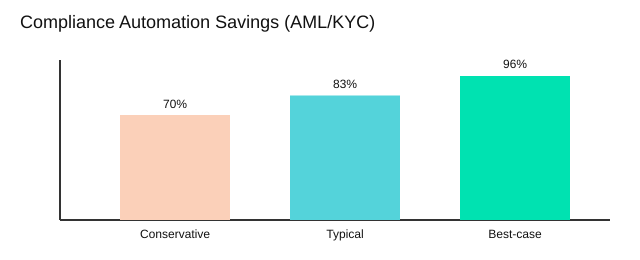
Confession: compliance processes are where I’ve seen the most “quiet burnout”—and also the clearest AI wins. The work is repetitive, high-stakes, and never really “done.” When we apply compliance automation the right way, we don’t remove responsibility; we remove the chaos. Research-backed results are hard to ignore: AI can automate AML/KYC work and cut costs by 70–96% while making audits faster because evidence is captured continuously, not assembled later [1].
“In regulated environments, speed is valuable only when it comes with traceability.” — Gina Haspel
AML checks: automate the grind, keep the judgment
For AML checks, AI is strongest at the front line:
- Automated: sanctions/PEP screening, name matching, entity resolution, alert triage, case summarization, and real-time monitoring signals.
- Still human: judgment calls on risk appetite, escalation decisions, SAR narratives, and “does this make sense?” context.
The practical shift is that analysts stop drowning in false positives and start spending time on the few alerts that truly matter.
KYC onboarding: fewer emails, faster client onboarding
In KYC onboarding, AI helps reduce back-and-forth without cutting corners: it extracts data from documents, checks completeness, flags inconsistencies, and routes exceptions. One case I remember stalled for days because two systems disagreed on address format (“Apt 4B” vs “#4B”). AI fixed the matching and suggested a standardized format, but our policy still required a human sign-off before approval. That’s the balance I want: speed with control.
| Metric | Before | After | Notes |
|---|---|---|---|
| Compliance cost (AML/KYC) | Baseline | -70% to -96% | [1] |
| Audit prep timeline | 3 weeks | 5 days | Scenario (faster audits) |
| Client onboarding cycle | 10 days | 3 days | Scenario (KYC automation) |
Regulatory reporting: structured data beats quarter-end heroics
Regulatory reporting improves when controls capture evidence continuously: who approved what, when, and why. My guardrails are simple: audit trails by default, model monitoring for drift, and the discipline to explain it to a regulator—in plain language, with receipts.
3) Fraud detection and anomaly detection: catching weirdness early
A story I wish wasn’t true: we had a tiny “round-number” expense pattern—$100, $200, $300—spread across teams. It looked harmless, and humans waved it through for months because each line item was small. That’s the trap: fraud hides in boring places.
Fraud detection with real-time monitoring
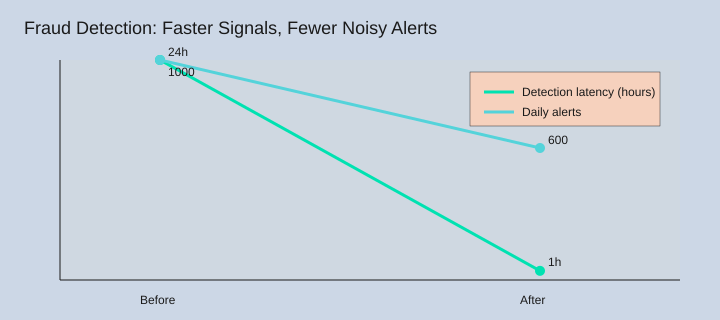
In financial services, fraud detection gets better when we move from 24-hour batch reviews to real-time monitoring. AI can watch transactions as they happen and flag suspicious behavior fast. As research notes, AI supports real-time transaction monitoring and stronger risk management signals (including predictive scoring) that help teams react sooner.[1][2]
“Fraud is a pattern-recognition game, and machines don’t get tired at 2 a.m.” — Hany Farid
Anomaly detection: flag the right things (mostly)
Anomaly detection is where the “weirdness” shows up: odd timing, unusual vendors, repeated round amounts, or spend that doesn’t match a role. I once ignored a fraud alert because it “looked like a system glitch”—it wasn’t. The win isn’t perfect accuracy; it’s faster learning. In one tuning scenario, we cut noisy alerts from 1,000/day to 600/day by feeding outcomes back into the model.
Spend management + procurement: generative AI helps
In spend management, generative AI can support procurement controls by summarizing vendor changes, spotting duplicate invoices, and comparing contract terms to invoices. Research also points to generative AI helping forecast prices, detect fraud in vendor activity, and automate parts of vendor management.[2]
Risk management crossover (yes, really)
I want fraud teams and FP&A sharing signals: vendor risk, budget variance, and even brief notes on portfolio risk exposure. When the same vendor spikes in spend and shows odd payment patterns, that’s not “someone else’s problem.”
- Watch for false positives (alert fatigue kills adoption).
- Watch for feedback loops (bad labels train bad models).
- Don’t “set and forget”—controls drift as behavior changes.
| Item | Illustration / Context |
|---|---|
| Agentic AI adoption focus (2026) | Fraud + FP&A are key focus areas.[4] |
| Daily fraud alerts (scenario) | 1,000/day → 600/day after tuning |
| Detection latency (scenario) | 24h batch → near real-time (~1h) |

4) AI-driven forecasting: cash flow, scenario modeling, and my favorite ‘what if’
Why forecasting used to feel like weather prediction
Forecasting used to be a monthly scramble: export, reconcile, argue about assumptions, then publish a number everyone knew would be wrong in two weeks. It felt like weather prediction with fewer satellites. What changed is AI-driven forecasting paired with better data pipelines—so the model updates as the business moves, not after the month closes.
“Forecasts should be living models, not monthly rituals.” — Aswath Damodaran
Cash flow forecasting: from monthly snapshots to daily/real-time
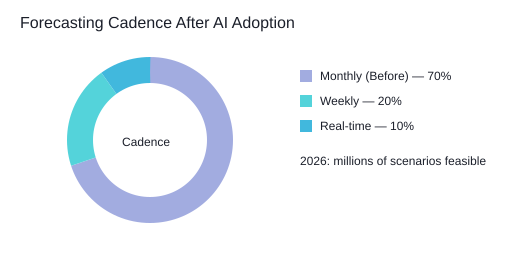
In Finance Ops, cash flow forecasting is where the value shows up fast. Instead of one “official” view, I can refresh projections daily (and in some cases near real-time) using predictive analytics on invoices, payment behavior, seasonality, and collections activity. The practical win is decision cadence: weekly or daily actions on working capital, not monthly post-mortems. One aside: sometimes the best improvement isn’t AI—it’s fixing master data and definitions (customer IDs, payment terms, “due date” logic). Garbage in still means garbage out.
Scenario modeling at millions-scale (and why it’s comforting)
By 2026, research points to AI-driven forecasting supporting real-time cash flow projections and millions of scenario modeling simulations [2]. That matters because I don’t need one perfect forecast; I need a range of outcomes with clear drivers. When I can run 1,000,000+ variations (millions-scale), I stop debating “the” assumption and start planning options.
Autonomous forecasting vs practical predictive analytics
Autonomous forecasting is the buzzword. In practice, I focus on repeatable predictive analytics: automated data pulls, model monitoring, and alerts when reality drifts. The human job becomes setting guardrails, approving overrides, and asking better questions—aligned with AI trends for 2026: faster cycles, more simulations, tighter feedback loops.
My favorite ‘what if’: top customer pays 20 days late
- Input: “Customer A pays 20 days late for the next 60 days.”
- Model response: recalculates receipts timing, short-term cash gap, and covenant headroom in minutes.
- Action: suggests levers (collections outreach, credit hold, draw revolver, delay spend) and shows impact by day.
| Item | Value | Note |
|---|---|---|
| Year reference | 2026 | Real-time projections + millions of scenarios [2] |
| Scenario simulations | 1,000,000 | Placeholder for millions-scale [2] |
| Forecast refresh rate | Monthly → Daily/Real-time | Illustrative shift after AI adoption |
5) Financial close goes from “event” to “system”: reconciliations, audit prep, and AI agents
“The close is a control system, not a sprint.” — Mary Schapiro
The real flex isn’t closing fast—it’s closing calmly. I used to treat the financial close like a monthly emergency: late nights, Slack pings, and a checklist that only worked if everyone remembered it. Then I saw what happens when agentic AI and automated reconciliations turn close into a system that runs every day, not a scramble at month-end.
From days to near real-time: automated reconciliations + agentic AI
In the source research, AI agents compress close cycles from “days” to “near real-time” by continuously matching transactions, flagging exceptions, and routing work to the right owner. In plain terms, instead of a 5-day close, you can aim for a 1-day scenario because most items are already reconciled before the calendar flips.
- Reconciliations: bank, card, and clearing accounts matched daily; exceptions queued.
- Journal entries: suggested entries drafted with support attached, then approved by policy.
- Close checklist automation: tasks triggered by data readiness, not by someone’s memory.
Real results back this up: case outcomes show a 90% reduction in bank reconciliation time and a month-end close 3 days faster. The first close after we implemented this, I actually took a lunch break. Not a “lunch at my desk” break—an actual one.
Audit prep becomes background work (not a fire drill)
Good audit prep is mostly evidence collection and consistency. With the right AI platforms, evidence can be gathered as transactions happen: approvals, reconciliations, and supporting documents linked automatically. When auditors ask, you’re not hunting—you’re exporting.
My imperfect takeaway: fix the plumbing first
You can’t automate a broken chart of accounts. If your mapping rules are messy, your entities aren’t aligned, or your policies are unclear, agentic AI will just move the confusion faster. Clean the structure first, then enjoy the cost savings and the calm.
| Metric | Result |
|---|---|
| Bank reconciliation time | 90% reduction [1] |
| Month-end close | 3 days faster [1] |
| Close cycle | 5 days → 1 day scenario (near real-time) [2] |
<svg width="640" height="220" viewBox="0 0 640 220" xmlns="http://www.w3.org/2000/svg">

<rect width="640" height="220" fill="#D1D8DC"/>

<text x="20" y="30" font-family="Arial" font-size="18" fill="#000">Financial Close Acceleration with AI Agents</text>
<text x=”20″ y=”70″ font-family=”Arial” font-size=”14″ fill=”#000″>Bank reconciliation time (index)</text>
<rect x=”20″ y=”85″ width=”500″ height=”22″ fill=”#FBD0B9″/>
<text x=”530″ y=”101″ font-family=”Arial” font-size=”12″ fill=”#000″>Before: 100</text>
<rect x=”20″ y=”120″ width=”50″ height=”22″ fill=”#54D3DA”/>
<text x=”80″ y=”136″ font-family=”Arial” font-size=”12″ fill=”#000″>After: 10</text>
<circle cx=”520″ cy=”170″ r=”6″ fill=”#00E2B1″/>
<text x=”535″ y=”175″ font-family=”Arial” font-size=”12″ fill=”#000″>Month-end close: -3 days</text>
<rect x=”20″ y=”155″ width=”8″ height=”40″ fill=”#A2ACE0″/>
<text x=”35″ y=”180″ font-family=”Arial” font-size=”12″ fill=”#000″>Marker</text>
</svg>

6) The part nobody posts about: adoption, governance, and the “use case trap”
In Finance Ops, the hard part isn’t the demo. It’s adoption. I’ve watched AI implementations plateau because teams run too many pilots, nobody owns the workflow end-to-end, and there’s no operational metric that proves value. That’s the “use case trap” (a banking.vision-style framing I agree with): we optimize for outcomes, not shiny AI use cases.
“Strategy isn’t choosing what to do—it’s choosing what not to automate yet.” — Roger L. Martin
Why AI implementations stall: pilots without a scoreboard
A common pattern looks like this: 10 pilots → 2 scaled (and sometimes zero). The missing piece is usually a single “north star” metric tied to the close, AP cycle time, exception rate, or cost-to-serve. If the metric isn’t owned by Finance Ops—not IT—adoption fades when the project team moves on.
Adoption reality check: agentic AI and the talent squeeze
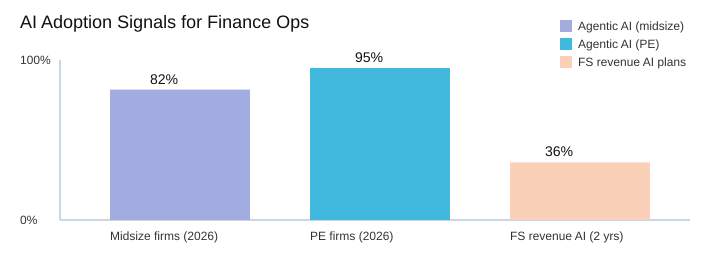
AI trends are moving fast. Agentic AI adoption is projected to reach 82% in midsize firms and 95% in PE firms by 2026, often focused on fraud and FP&A [4]. That tells me two things: (1) talent will be the bottleneck, not tools, and (2) Finance Ops leaders need people who can write requirements, test controls, and run change management—not just “prompt.” In financial services, 36% of firms plan AI for revenue-boosting models in the next two years [7], which raises the bar for governance and speed.
Risk management that keeps AI in production
In financial services, risk management can’t be an afterthought. I bake in three controls early: model drift monitoring (so accuracy doesn’t decay), tight access controls (least privilege), and segregation of duties (no one person can create, approve, and pay). My governance checklist also includes data lineage, regulatory reporting readiness, and human-in-the-loop for high-risk decisions.
Case studies to steal from (not copy)
Tesco, Barclays, and Logitech are useful case studies because they show patterns: AI optimizing AP, analytics, and cost savings [3]. I don’t copy their exact stack. I look for what they measured, how they handled exceptions, and how they proved value to operators—not just executives.
| Signal | Data | Source |
|---|---|---|
| Agentic AI adoption (2026) | 82% midsize firms | [4] |
| Agentic AI adoption (2026) | 95% PE firms | [4] |
| FS revenue AI plans | 36% in next 2 years | [7] |
| Pilot-to-production (illustrative) | 10 pilots → 2 scaled | Scenario |
My closing opinion: pick one painful workflow, ship it, and make it boringly reliable. When the team trusts the numbers and the controls, you earn the right to get fancy with agentic AI—without falling back into the use case trap.
TL;DR: AI is transforming finance operations through workflow automation, compliance automation (AML/KYC), fraud detection, and AI-driven forecasting. Reported gains include 70–96% compliance cost reduction, 75% less manual effort, 5× faster loan approvals, 90% faster reconciliations, and 3-day faster month-end close—when the rollout is scoped, governed, and measured.


