

Last month I caught myself doom-scrolling “AI News” at 11:47 p.m. (classic). The next morning, none of those updates helped me ship a better page—or pick a better keyword. That was the moment I started treating AI news like ingredient labels: useful only if you know what you’re cooking. In this outline, I’m mapping how I turn AI releases into Keyword Extraction ideas, Long Tail opportunities, and content tagging that actually improves search relevance—without pretending every new model is a miracle.
1) My “AI News” filter: what I keep, what I toss
I treat AI News updates like a triage list. I’m not trying to read everything. I’m trying to spot the few changes that will actually shift how people search and what they expect to see. In the “AI News: Latest Updates and Releases” stream, the same patterns show up again and again: new model releases, new AI engines, and new search features that change user behavior. Those are the items I keep.
What I keep: changes that move search intent
My quick litmus test is simple: does this change search intent, or just add a shiny new UI? If the update changes what users ask, how they phrase queries, or whether they click through, it matters for AI SEO and keyword research.
- Model releases that improve reasoning, memory, or multimodal answers (because users ask broader questions and expect complete responses).
- AI engines that power assistants, browsers, or devices (because they become a new “front door” to information).
- Search features like AI summaries, answer boxes, or shopping assistants (because they can reduce clicks or change which keywords convert).
When I see one of these, I immediately ask: “Which queries will shift from short to long?” and “Which topics will become ‘one-and-done’ answers inside the results page?” That’s where keyword research that works starts now.
What I toss: hype that doesn’t change behavior
I toss most announcements that are basically “same product, new coat of paint.” New templates, new chat skins, and vague “breakthrough” claims rarely change what people type into search. They may be interesting, but they don’t change my keyword map.
If it doesn’t change user behavior, it doesn’t change my SEO plan.
My one-sentence habit (no vendor adjectives)
A tiny habit that helps: I write one sentence per news item in plain English, with no vendor adjectives. This forces clarity and stops me from repeating marketing language.
| News item type | My one-sentence rewrite |
|---|---|
| Model update | “This model answers more complex questions, so users may search with fewer follow-up queries.” |
| Search feature | “This feature shows answers on the results page, so informational keywords may lose clicks.” |
| AI engine | “This assistant becomes a new discovery channel, so brand and comparison queries may shift.” |
Sometimes I even format it like a tiny rule:
Update → Behavior change → Keyword impact
Tangent (but true): I watch quiet tool shipping
Tangent (but true): I ignore 80% of “breakthrough” threads and watch what SEO tools quietly ship instead. Tool updates often reveal what’s working in the real world: new keyword clustering methods, SERP feature tracking, AI overview monitoring, and content brief changes. If multiple platforms add the same tracking feature, that’s usually a stronger signal than a loud headline.
That’s my filter: keep the updates that reshape intent, toss the shiny UI noise, and translate every “AI News” item into a plain-English SEO consequence.

2) Context Aware Keyword Extraction: the part I used to skip
I used to treat keyword research like a guessing game. I’d open a tool, type a broad topic, and pick whatever had decent volume. It felt “SEO-ish,” but it didn’t feel true to what people were actually asking. Then I started working with more AI news-style content—fast updates, new releases, messy drafts—and I realized something: the best keywords were already in my raw material. I just wasn’t extracting them.
Why keyword extraction beats guessing
Now I pull key phrases from real text first: early drafts, support tickets, and sales calls. The mess is the point. People don’t speak in perfect head terms. They describe problems, compare tools, and repeat the same phrases in slightly different ways. That’s where the “working” keywords live.
- Drafts show what I’m already trying to explain (and what I keep repeating).
- Support tickets reveal pain points in the customer’s own words.
- Sales calls surface objections and “how do I…” questions that turn into headings.
This approach also fits the pace of AI updates and releases. When the news changes quickly, I don’t want to brainstorm keywords from scratch. I want to mine what’s already being said and ship faster.
Context-aware extraction (meaning over exact matches)
The shift that mattered most was going context aware. Instead of treating keywords as exact strings, I group terms by meaning—basically applying semantic search logic to planning. For example, “keyword extraction,” “keyphrase extraction,” and “pulling phrases from text” can belong in the same cluster even if the wording differs.
When I do this, I’m not just collecting a list. I’m building a map:
- Core topic (what the page is truly about)
- Supporting concepts (subtopics that deserve subheadings)
- Question-style phrases (often perfect for featured snippets)
The tool path I’ve actually tested: Spark NLP + YAKE
For fast, multilingual extraction with scores, I’ve had good results with Spark NLP plus the YAKE algorithm. YAKE is practical because it works directly on the text and returns keyword candidates with a score, so I can sort quickly and move on.
My workflow is simple:
- Paste messy text (notes, transcripts, drafts) into my pipeline.
- Run YAKE to extract keyphrases and scores.
- Group the results by meaning (not duplicates).
- Turn the best clusters into headings and internal links.
# Example idea (conceptual)

# Input: raw draft + tickets + call notes

# Output: keyphrases with scores for prioritizing headings
Mini-win: a featured-snippet-friendly subheading in under an hour
One time, YAKE pulled a phrase that kept showing up across a draft and two support threads: “context aware keyword extraction”. I used it as a subheading, answered it in two tight paragraphs, and added a short list underneath. Within an hour, the section was cleaner, more specific, and structured like a snippet target—because it came from real language, not my imagination.

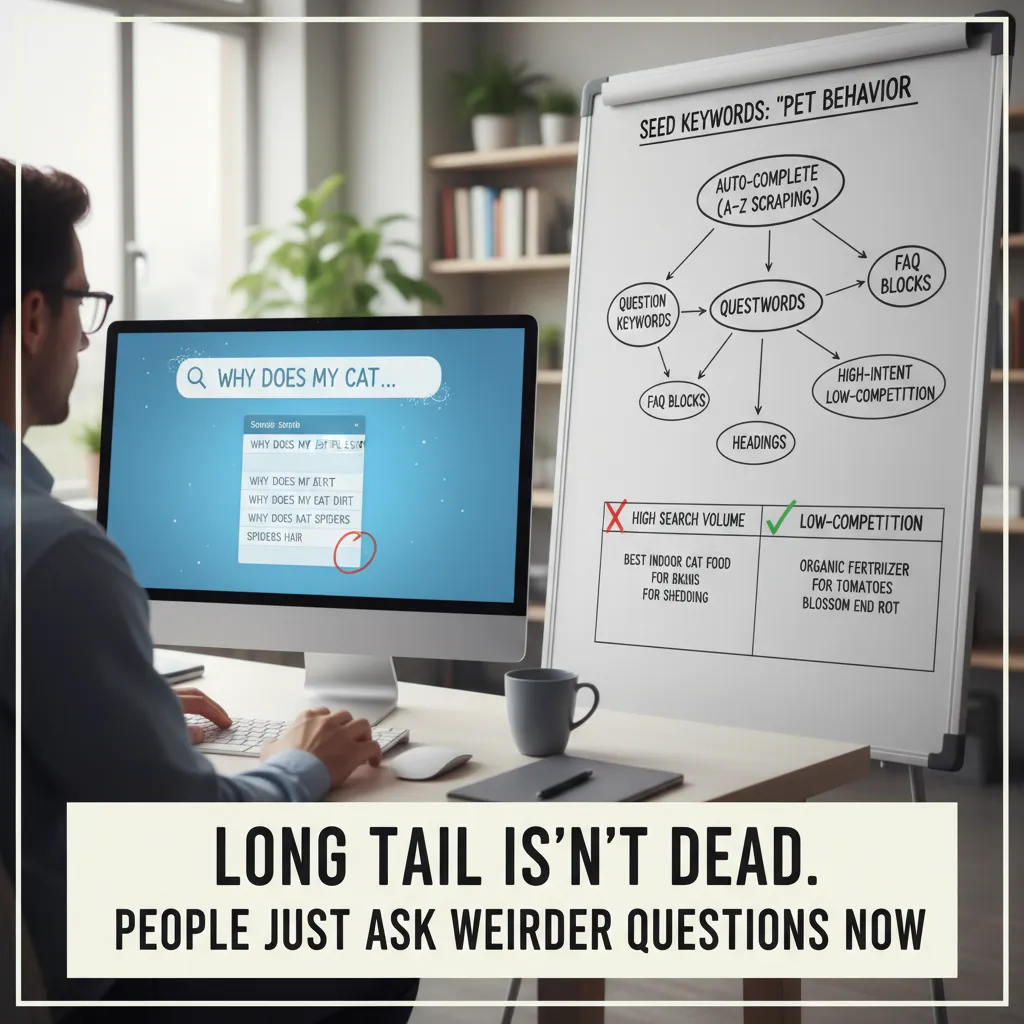
3) Long Tail isn’t dead—people just ask weirder questions now
When I track AI news and turn it into SEO ideas, I don’t start by hunting “big” keywords like AI updates or latest AI releases. Those are crowded, and they don’t tell me what the reader is trying to do. Instead, I lean into long tail. It’s not dead. It just got… stranger. People now search like they talk to an AI assistant: specific, messy, and full of context.
My long tail method: seed keywords + autocomplete “honesty”
I begin with a small set of seed keywords pulled from the topic itself—things like AI news, AI releases, model update, new AI tool, or AI feature rollout. Then I let autocomplete do the embarrassing honest work. I run A–Z scraping, because autocomplete reveals what people actually type when they’re confused, comparing options, or trying to fix something fast.
Here’s the simple workflow I use:
- Pick 3–5 seed keywords from the news topic.
- Append letters A–Z and record suggestions.
- Repeat with “for,” “with,” “vs,” “pricing,” “how to,” and “best.”
I’ll often keep a tiny note like this in my sheet:
seed: "AI news" + "a"..."z" → collect autocomplete phrases
I collect question keywords separately (they map to headings)
Question keywords are gold because they turn into clean page structure. I keep them in a separate list so I can drop them straight into H2/H3 headings and FAQ blocks. This is especially useful when covering fast-moving “latest updates and releases” style topics, where readers want quick answers, not a history lesson.
- How questions → step-by-step sections
- What is questions → definition + quick context
- Is it worth it questions → decision support
- Can I questions → compatibility and limits
I don’t chase volume—I chase “decision energy”
High search volume is nice, but it’s not my main filter. I look for high-intent, low-competition phrases that feel like a decision is happening. These are the searches that show someone is about to pick a tool, test a feature, or change a workflow because of an AI update.
| Keyword type | What it signals |
|---|---|
| “best X for Y” | Choosing a tool |
| “X vs Y for Z” | Comparing options |
| “X pricing / limits” | Purchase readiness |
| “how to enable / fix” | Immediate action |
Wild card: the “one-breath” voice query test
One trick I use is imagining an AI engine answering out loud. If I could ask one question in one breath, what would it be? That’s where the weird long tail lives—hyper-specific, real-life, and usually underserved.
If an AI answered me out loud, I’d ask: “What changed in the latest release, and what do I need to do differently today?”
4) Keyword Score, Search Relevance, and the uncomfortable truth about “good” keywords
When I turn AI news into AI SEO, I don’t start by hunting for the “best” keyword. I start by asking what I can actually explain well. The uncomfortable truth is this: a keyword can look amazing in a tool and still be a bad fit for my page.
Two-layer scoring: tool score vs. credibility score
I score keywords in two layers. Layer one is what the tool says: keyword difficulty, competition, and some kind of keyword score. Layer two is my credibility score: can my page credibly answer the search?
- Layer 1 (Tool score): difficulty, volume, SERP competition, and how many strong domains already rank.
- Layer 2 (Credibility score): do I have real coverage, examples, and clear definitions, or am I stretching?
For example, if I’m writing about “latest updates and releases” in AI, I can usually answer queries like AI model release notes or new AI features better than I can answer something like best GPU for training LLMs. The second keyword might have great volume, but it’s not what my page is built to do.
Search relevance isn’t a vibe
I treat search relevance like a matching problem, not a feeling. I look for semantic relationships: entities, synonyms, and near-duplicate intents. In AI news content, the entities are often the real anchors: model names, company names, product features, benchmarks, and release dates.
Here’s what I check before I commit to a keyword:
- Entities: Does the query imply specific things I must mention (e.g., “OpenAI,” “Gemini,” “Claude,” “API,” “release”)?
- Synonyms: Are people searching “launch,” “release,” “update,” “rollout,” or “announcement” for the same idea?
- Intent twins: Are there near-duplicate intents like “AI news today” vs. “latest AI updates” that I can cover with one strong page?
“Good keywords” are often just keywords that match what you can explain clearly, with proof, in the format people expect.
Content tagging is my cheat code
Tagging sounds boring, but it’s one of my highest-leverage moves. Consistent tags help internal search and on-site personalization, not just Google. When I publish AI news updates, I tag by model, company, topic, and format.
| Tag type | Examples | Why it helps |
|---|---|---|
| Entity | OpenAI, Anthropic, Google | Groups related releases and improves site navigation |
| Topic | AI safety, agents, image generation | Builds topical clusters for SEO and readers |
| Format | release notes, recap, comparison | Matches intent and improves internal recommendations |
My small confession: the “spite keyword”
I still keep one spite keyword: a term a competitor “owns” that I want to steal back (politely). I don’t chase it blindly. I just keep it on my list, watch the SERP, and wait until I have a real angle—like a clearer explainer, fresher AI updates, or better tagging that connects the full story.
5) Turning releases into a repeatable AI SEO workflow (so I can sleep)
AI news moves fast. New model releases, search features, and tool updates can make yesterday’s “best practice” feel old. So I stopped chasing every headline and built a simple weekly workflow that turns releases into repeatable AI SEO actions. The goal is not to react to everything—it’s to ship small improvements that compound.
My weekly loop: news → one test → keywords → publish → measure
Each week I run the same loop: I collect AI news, then I pick one change worth testing. That “one change” might be a new way AI engines summarize pages, a shift in how results show citations, or a tool update that affects content creation. I don’t try to rebuild my whole site. I choose one page type (like a product page, a guide, or a glossary entry) and run a controlled update.
Next, I run keyword extraction from the release notes and coverage. I pull out the nouns and verbs that show what changed, who it affects, and what problems it solves. Then I expand into long-tail queries that match real intent, like “how to,” “best way to,” “vs,” “pricing,” “limitations,” and “examples.” After that, I publish the update, and I measure results: rankings, clicks, and whether the page is getting the right kind of traffic.
My “living changelog” page keeps me consistent
The biggest thing that keeps this workflow calm is one internal page I maintain as a living changelog of AI-powered adjustments. It’s not public. It’s my record of what I changed, why I changed it, and what happened after. I log updates to titles, headings, schema, and internal links, plus the date and the pages affected. When I feel tempted to “optimize everything,” I read the changelog and remember what actually moved the needle.
AI speeds up insights, but SERPs are the truth
I do use AI engines to move faster—especially to summarize releases and suggest related terms—but I treat those outputs as a draft, not a decision. Before I commit, I verify in the SERPs and on real competitor pages. I check what Google is rewarding right now: the formats ranking (guides, tools, lists), the angle (beginner vs advanced), and the language people use in headings. If the SERP shows “templates” and “examples,” I add them. If it shows “definition” and “use cases,” I tighten the intro and structure.
That’s how I turn “AI News: Latest Updates and Releases” into steady SEO progress: one test at a time, tracked, measured, and repeated. And here’s my weird but useful analogy: it’s like sourdough. Your starter is your seed keywords from the release. The fermentation is semantic AI expanding those seeds into long-tail topics and related entities. And the taste test is search intent—what the SERP proves people actually want. Do that weekly, and your SEO keeps rising while you finally get to sleep.
TL;DR: I use AI news as a trigger for better AI SEO keyword research: start with context aware keyword extraction (NLP + semantic AI), expand into long tail and question keywords (auto-complete A–Z), score opportunities (difficulty 0–30 + keyword score), then validate with competitor analysis and measure outcomes like conversion lift and manual effort reduction. Tools and concepts: Lucidworks AI Boosters, Spark NLP + YAKE, transformer models, hybrid/semantic search, and intent-driven topic clusters.


