I used to think “AI in sales” meant a fancy email generator and a dashboard that yelled at me in red. Then I watched a rep on my team spend 40 minutes copying call notes into a CRM while a hot inbound lead cooled off. That day I started treating AI like an actual teammate: great at the boring parts, occasionally overconfident, and in desperate need of clear rules. This guide is the version I wish I’d had—messy edges included.
1) My “why now” moment: Transform Sales Approach (without hype)
I didn’t start using AI in sales because I was lazy or chasing a trend. I started because I was tired. Not “too many calls” tired—more like too many tabs tired. The real pain wasn’t lack of effort. It was the invisible tax of context-switching: CRM notes, call recordings, LinkedIn, email threads, meeting agendas, proposal docs, and “where did I save that objection list?”
In The Complete Sales AI Strategy Guide, the idea that stuck with me was simple: speed doesn’t come from working harder; it comes from reducing friction. My “why now” moment was realizing I was spending prime selling hours doing work that looked productive but wasn’t moving deals forward.
A quick gut-check I run every week
I ask myself one question: Which tasks feel like sales, and which feel like data entry wearing a sales hat?
- Feels like sales: discovery, listening, reframing problems, handling objections, negotiating, building trust.
- Feels like data entry: logging notes, summarizing calls, updating fields, drafting follow-ups from scratch, researching basics I’ve researched 50 times.
That gut-check makes the AI strategy obvious. I don’t use AI to “replace selling.” I use it to remove the drag that keeps me from selling.
My rule: automate what doesn’t require taste
A small personal rule I follow: automate anything that doesn’t require taste, empathy, or negotiation posture. If the task is mostly formatting, summarizing, sorting, or first-draft writing, AI can help. If the task requires reading the room, choosing the right tone, or making a trade-off in a deal, that stays with me.
AI is best when it handles the repeatable parts, so I can spend more time on the human parts.
AI as a sous-chef (fast with prep, risky with seasoning)
I treat AI like a sous-chef: it’s fast with prep, but dangerous with seasoning. It can chop the ingredients—pull key points from a call, draft a follow-up, suggest next steps. But I’m still the one who tastes and adjusts. I review every message for accuracy, tone, and intent.
Setting expectations early
One more thing I’m clear about: AI helps me move faster, but it doesn’t magically fix a broken offer or weak messaging. If the value prop is fuzzy, AI will just help me say fuzzy things more efficiently. My goal is a cleaner sales process—not hype, not shortcuts, just better execution.

2) AI Essential Sales: where I see quick wins (and where I don’t)
When I apply what I use from The Complete Sales AI Strategy Guide, I’m not looking for “AI everywhere.” I’m looking for fast, repeatable wins that reduce busywork without making my pipeline messy. Here’s where AI helps me most—and where I keep it on a short leash.
Prospecting and qualification: AI does the first pass
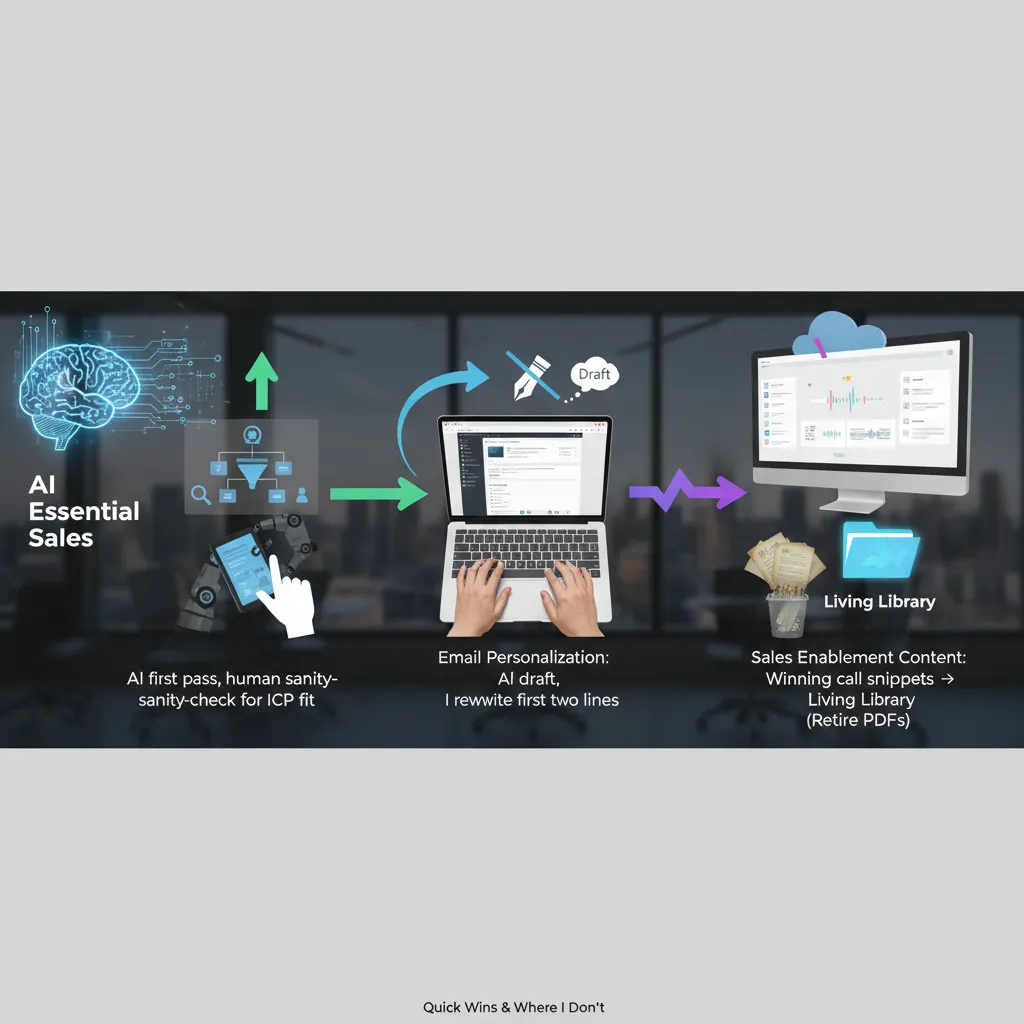
I let AI handle the first sweep: pulling account lists, spotting basic firmographic matches, and summarizing what a company does. This is a quick win because it saves hours of tab-hopping.
But I always do a human sanity-check for ICP fit. AI can “match” a company that looks right on paper while missing the real buying trigger, the org structure, or the reason they won’t buy from us.
- AI: shortlist accounts, enrich notes, flag obvious mismatches
- Me: confirm ICP, check intent signals, validate the actual problem
Email personalization automation: draft with AI, open like a human
I use AI to generate a first draft fast: subject line options, a few angles, and a clean structure. Then I rewrite the first two lines so it sounds like me. Those lines decide if the email feels real or like a template.
My rule: AI can write the body, but I write the “hello” and the “why you.”
If I don’t edit the opening, AI tends to over-explain, over-praise, or sound generic. That hurts reply rates more than it helps.
Sales enablement content: build a living library from winning calls
Instead of pushing more PDFs, I turn winning call snippets into a searchable library: objection handling, competitor talk tracks, pricing framing, and short customer stories. AI helps tag, summarize, and group clips so reps can find what they need in minutes.
- Keep: clips that show what actually works
- Retire: “dead PDFs” nobody trusts or updates
Deal intelligence: I want next best action, not a recap
AI is useful when it tells me what to do next: who to loop in, what risk is showing up, what question I didn’t ask, and what step is missing. I don’t want a 12-page recap of my own pipeline. I want next best action with clear evidence (call moments, email threads, stage history).
Tiny tangent: AI will scale your imagination
If your buyer journey mapping is imaginary, AI will politely scale your imagination. Garbage process in, faster garbage out. I only automate what I can explain on a whiteboard.
3) Deep Personalization Scale meets True Multi-Channel Orchestration
In my “Sales AI Strategy Guide I Actually Use,” this is where AI either earns trust or burns it. I follow a simple rule I stole from my own mistakes: one-message-per-human. Every sequence must include at least one line that only a real person would notice. Not “Hope you’re doing well.” I mean something specific: a product launch, a hiring pattern, a quote from a webinar, or a workflow detail that shows I paid attention.
My “one-message-per-human” rule (how I apply it)
- One custom line per sequence that can’t be copied to another account without sounding wrong.
- I let AI draft options, but I choose the angle and edit the final sentence.
- If I can swap the company name and it still works, it fails.
True multi-channel orchestration (not spam everywhere)
I orchestrate across email + LinkedIn + call + a short video, but only when the signal is real. AI helps me track signals like clicks, replies, site intent, or a meaningful profile view. If there’s no signal, I don’t “add channels.” I tighten the message.
Here’s a simple orchestration logic I use:
| Signal | What I do |
|---|---|
| Email click (pricing/case study) | LinkedIn follow + short email with one question |
| Reply with friction | Call attempt + 30-second video addressing the concern |
| No engagement | Pause or switch to a lower-frequency nurture |
Sentiment analysis: coaching tool, not buyer mind-reading
Sentiment analysis is useful, but I keep it in its lane. I use it for coaching (did my rep sound rushed?) and risk flags (is the thread turning negative?). I don’t treat it like truth. Buyers are nuanced, and AI can misread short replies.
Timing matters: when AI should pause
Hypothetical scenario: my AI detects the prospect’s company announced layoffs. The system pauses outreach and tags the account for review. No “just circling back” email goes out that week. That’s not being clever—it’s being human.
I once over-automated a sequence and it sounded like a horoscope. Never again.
Now I use AI to scale the work around personalization—research, drafting, routing, and timing—while I protect the parts that require judgment.
4) Enhanced Forecast Accuracy: my boring superpower (pipeline visibility management)
I treat forecasting like weather: you won’t control it, but you can stop pretending it’s sunny. My goal isn’t a “perfect” forecast. It’s a forecast that tells the truth early enough to act. In my Sales AI Strategy Guide I Actually Use, this is where AI earns its keep: not by guessing revenue, but by improving pipeline visibility management so the risk is visible before the quarter ends.
Pipeline visibility management: unify contact + deal data
Most forecast misses aren’t caused by bad math. They happen because key signals are trapped in someone’s inbox, call notes, or Slack. I use AI to unify contact + deal data so the CRM reflects reality: meetings, emails, stakeholders, and next steps all tied to the right opportunity. When the data is connected, the pipeline stops being a set of “stages” and starts being a set of verifiable behaviors.
Deal intelligence analysis: flag slippage before it’s obvious
Deal intelligence analysis is simple in practice: I want the system to warn me when a deal is drifting. The patterns are boring, but reliable:
- Next steps stall (no meeting booked, no mutual plan updated)
- Champions go quiet (reply time increases, engagement drops)
- New stakeholders appear (legal/procurement enters late)
- Pricing pressure shows up (discount talk without value talk)
When AI flags these, I don’t treat it like a verdict. I treat it like a weather alert: “conditions are changing—check the radar.”
Competitive intelligence tracking (without the novel)
Competitive intelligence tracking matters because “we’re also looking at…” is often said casually, then forgotten. I capture competitor mentions from calls and emails and attach them to the deal automatically. Reps shouldn’t have to write a novel in the CRM to be helpful. I just need:
- Who else is in the deal
- Why we might lose
- What the buyer cares about most
If you only do one thing: make CRM integration seamless so the forecast isn’t built on vibes.
That means automatic activity capture, clean field mapping, and one source of truth for contacts, accounts, and opportunities. If the CRM is easy to keep accurate, forecast accuracy follows.
5) AI Sales Tools Compared: the shopping list I wish I had
I used to start my “sales AI” search by looking at tool lists. Now I start with workflow friction. Where does the work slow down or break: prospecting, qualification, follow-up, coaching, or forecasting? That order matters, because the best AI sales tool is the one that removes the most drag in the exact step where my team loses time and deals.
The categories I actually compare (not brand names)
From The Complete Sales AI Strategy Guide, the pattern is clear: AI wins when it supports the rep’s daily actions, not when it adds another dashboard. Here’s my “shopping list” by job-to-be-done:
- AI lead enrichment: fills missing firmographic data, surfaces buying signals, and keeps records fresh.
- Real-time lead qualification: flags fit and intent while I’m working the lead, not two days later.
- Follow-up assistance: drafts emails, suggests next steps, and reminds me when a deal goes quiet.
- Sales coaching recommendations (explainable): call summaries, talk-time patterns, and specific coaching notes I can verify.
- Forecasting support: risk alerts and pipeline hygiene prompts tied to CRM activity.
What I look for before I get impressed
My baseline requirements are simple: enrichment, qualification, and coaching that is explainable. If the tool says “this deal is at risk,” I want to see the reasons: no meeting booked, champion went silent, pricing page visits, or missing next step.
Slightly spicy opinion: if a tool can’t show me why it suggested an action, I don’t trust it with my pipeline.
Integration reality check (where AI sales projects die)
AI sales integration fails when data lives in five places and none agree on the account name. Before I buy anything, I check: does it write back to the CRM, does it respect existing fields, and can it handle duplicates without creating a mess?
My practical scoring rubric
| Criteria | Weight | What I’m asking |
|---|---|---|
| Impact | 40% | Will it move meetings, conversion, or cycle time? |
| Adoption likelihood | 25% | Will reps use it without being chased? |
| CRM fit | 20% | Does it match our workflow and data model? |
| Time-to-value | 15% | Can we see results in weeks, not quarters? |
If a tool scores high but needs perfect data to work, I treat that as a warning, not a feature.

6) Key Benefits Performance: the scoreboard (Improved Win Rates + sanity)
Before I automate anything, I decide what “better” means. Otherwise AI just makes me faster at doing the wrong work. In my own Sales AI Strategy Guide I Actually Use, I track four core numbers: conversion rate improvement (stage-to-stage and win rate), cycle time (first meeting to close), meetings-to-opps (how many real opportunities come from booked calls), and forecast variance (how far my forecast is from reality). These are simple, but they tell me if AI sales enablement is helping the team or just creating noise.
Baseline first: I measure the “before” honestly
I set a baseline week by pulling the last 8–12 weeks of data. Not the best month. Not the quarter where one whale deal made everything look amazing. I’ve made that mistake, and it made every AI rollout look like a failure because the comparison was unfair. When I use a clean baseline, I can see small wins quickly—like a 10% lift in meetings-to-opps or a few days shaved off cycle time—without pretending AI is magic.
Coaching loop: summaries and sentiment, not surveillance
Once the baseline is set, I use AI call summaries and sentiment analysis as a coaching loop. The goal is drills, not micromanagement. If summaries show we’re skipping discovery, I’ll run a short practice on question flow. If sentiment drops when pricing comes up, we’ll rehearse that moment. I’m not trying to “catch” reps. I’m trying to give them fast feedback they can actually use, while keeping the manager workload sane.
The human check: because bad automation can “work” until it doesn’t
I also track one metric that isn’t in most dashboards: rep sentiment and customer complaints. Bad automation can boost activity and even short-term conversion, while quietly damaging trust. If reps feel like they’re fighting the tools, or customers start replying with “stop spamming me,” I treat that as a performance issue—even if the numbers look fine for a week or two.
That’s my scoreboard. Improved win rates matter, but so does sanity. In the end, AI Sales Enablement is less about replacing reps and more about protecting their attention—so they spend more time on real conversations and less time on busywork that never closed a deal.
TL;DR: If I had to boil it down: start with clean, unified data; deploy AI sales tools where they shorten cycles (prospecting, qualification, follow-up, forecasting); measure impact on conversion and variance; and keep humans in charge of judgment, ethics, and relationships.